Essayora Mobile Update: Expand Essays on Phones with Ease
Learn how to expand an essay on your phone without losing meaning or tone. This guide explains mobile essay expansion, common writing problems on small screens, and how to turn short ideas into clear, well-structured paragraphs easily.
 Reviewed by: Nina Harwood
Writing essays on the phone was never my plan.
But it became my reality.
Ideas hit me while traveling.
While scrolling.
Sometimes late at night.
Opening a laptop every time wasn’t practical.
That’s where the Essayora Mobile Update changed everything for me.
I just connect to the internet through a hotspot or any other connection, and Essayora is ready to use.
There’s no complicated sign-in or sign-up process. I simply open it on my phone, paste my text, and get the expanded version of my essay instantly.
I’ve been using Essayora for a while. After testing the mobile update on essayora.com, my writing process became faster and less frustrating, especially when working from my phone.
This post shares my real experience using it on mobile.
No hype.
Just practical results.
Why essay writing on a phone feels limiting
Phones are convenient. But they come with limits.
Most writers face the same issues:
- Short paragraphs
- Weak explanations
- Broken flow
- Notes that stay unfinished
Writing long content on a small screen makes it harder to explain ideas clearly. That’s the real problem.
This matters because most tools struggle to perform well on mobile devices.
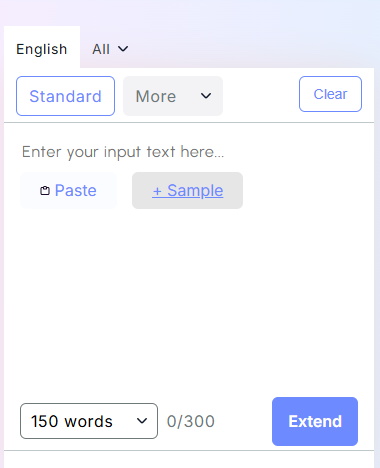
Here is the essayora mobile dashboard showing text input and expand button:
What actually improved with the mobile update
This update wasn’t just about design.
It focused on writing quality.
1. Context-aware expansion on small screens
Mobile writing often loses context.
Essayora didn’t.
Through several micro changes in essays, the tool now understands what your paragraph is trying to say—even when the input is short or rough.
It reads what comes before and what should come next.
That leads to:
- Better flow
- Clear structure
- Connected paragraphs
2. Keeps original intent intact
Length of the text is not the goal. Intent is.
Causes stay causes. Explanations stay explanations.
The message remains the same. Only clearer.
This accuracy is part of essayora's newest features, especially noticeable when expanding essays on a phone.
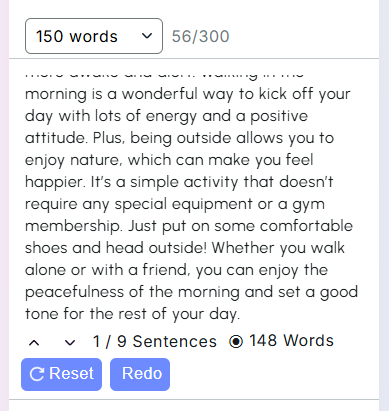
Highlighted intent preservation on mobile-expanded paragraph:
3. No fillers. No repetition.
Many expanders rely on fluff.
This one doesn’t.
Sentences add value. Transitions feel natural. Even on small screens.
4. Tone stays consistent
Different writing styles were tested:
- Explanatory
- Argumentative
- Descriptive
The tone stayed consistent.
That wasn’t always the case before. Now it works automatically.
5. Works seamlessly on Android and Apple phones
Whether I use my Android or my iPhone, Essayora functions the same.
The interface adapts to different screen sizes without losing features or performance.
Expanding essays is just as smooth on both platforms, which makes writing easy and reliable.
Real mobile essay example
I wrote this rough line on my phone:
“Social media affects student focus and mental health…”
Short.
Weak.
Incomplete.
Then I expanded it using Essayora.
The result was clearer and more structured.
No added fluff.
No off-topic lines.
This became especially obvious when comparing essayora with others, many of which still struggle to deliver clean and accurate mobile expansions.
How essayora mobile changed my writing routine
Before:
Notes stayed unfinished
Ideas felt scattered
Writing felt restricted
After:
Essays get completed anywhere
Ideas expand instantly
Time and effort are saved
The writing stays yours. The tool just supports the process.
Final thoughts
The essayora mobile update made expanding essays on phones practical and effortless. The writing never feels rushed, robotic, or shallow, just clear, meaningful, and well-structured.
Good essays aren’t about length; they’re about explanation. Using essayora on my phone helped me achieve that, and it truly made a real difference in my writing.